
Create and read csv
Spreadsheets often export CSV (comma seperated values) files, because they are easy to read and write. A csv file is simply consists of values, commas and newlines. While the file is called 'comma seperate value' file, you can use another seperator such as the pipe character.
Create a spreadsheet file (CSV) in Python Let us create a file in CSV format with Python. We will use the comma character as seperator or delimter.
import csv
with open('persons.csv', 'wb') as csvfile:
    filewriter = csv.writer(csvfile, delimiter=',',
                            quotechar='|', quoting=csv.QUOTE_MINIMAL)
    filewriter.writerow(['Name', 'Profession'])
    filewriter.writerow(['Derek', 'Software Developer'])
    filewriter.writerow(['Steve', 'Software Developer'])
    filewriter.writerow(['Paul', 'Manager'])
Running this code will give us this fil persons.csv with this content:
Name,Profession
Derek,Software Developer
Steve,Software Developer
Paul,Manager
You can import the persons.csv file in your favorite office program.
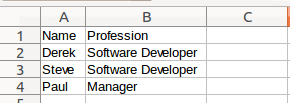 Spreadsheet file created in Python
Read a spreadsheet file (csv) If you created a csv file, we can read files row by row with the code below:
import csv
# open file
with open('persons.csv', 'rb') as f:
    reader = csv.reader(f)
# read file row by row
    for row in reader:
        print row
This will simply show every row as a list:
['Name', 'Profession']
['Derek', 'Software Developer']
['Steve', 'Software Developer']
['Paul', 'Manager']
Perhaps you want to store that into Python lists. We get the data from the csv file and then store it into Python lists. We skip the header with an if statement because it does not belong in the lists. Full code:
import csv
# create list holders for our data.
names = []
jobs = []
# open file
with open('persons.csv', 'rb') as f:
    reader = csv.reader(f)
# read file row by row
    rowNr = 0
    for row in reader:
        # Skip the header row.
        if rowNr >= 1:
            names.append(row[0])
            jobs.append(row[1])
# Increase the row number
        rowNr = rowNr + 1
# Print data
print names
print jobs
Result:
['Derek', 'Steve', 'Paul']
['Software Developer', 'Software Developer', 'Manager']
Most spreadsheet or office programs can export csv files, so we recommend you to create any type of csv file and play around with it :-)