
Flask web forms
Python hosting: PythonAnywhere: host, run and code Python in the cloud. Free tier available.
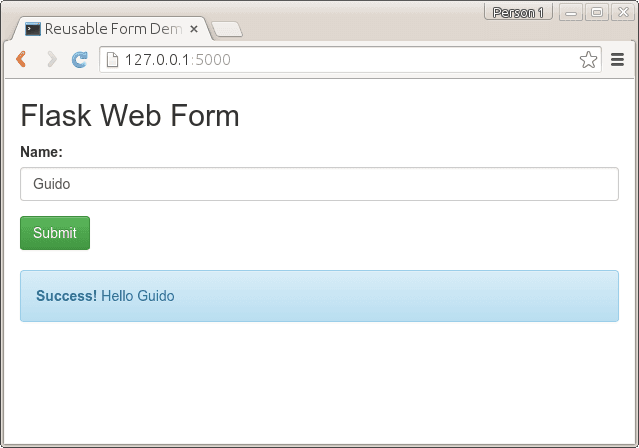 Flask web form
In this tutorial you will learn how to do form validation with Flask. Forms play an important role in all web applications.
We use WTForms, a module for validation of forms. We will start with a simple form containing one field asking for a name.
Flask web forms
We create this in code:from flask import Flask, render_template, flash, request
from wtforms import Form, TextField, TextAreaField, validators, StringField, SubmitField
# App config.
DEBUG = True
app = Flask(__name__)
app.config.from_object(__name__)
app.config['SECRET_KEY'] = '7d441f27d441f27567d441f2b6176a'
class ReusableForm(Form):
name = TextField('Name:', validators=[validators.required()])
@app.route("/", methods=['GET', 'POST'])
def hello():
form = ReusableForm(request.form)
print form.errors
if request.method == 'POST':
name=request.form['name']
print name
if form.validate():
# Save the comment here.
flash('Hello ' + name)
else:
flash('All the form fields are required. ')
return render_template('hello.html', form=form)
if __name__ == "__main__":
app.run()
We then line_number:false create the template hello.html in the /templates/ directory:
<title>Reusable Form Demo</title>
{% with messages = get_flashed_messages(with_categories=true) %}
{% if messages %}
<ul>
{% for message in messages %}
<li>{ { message[1] }}</li>
{% endfor %}</ul>
{% endif %}
{% endwith %}
<form action="" method="post">
{ { form.csrf }}
<div class="input text">
{ { form.name.label }} { { form.name }}</div>
<div class="input submit">
<input type="submit" value="Submit"></div>
</form>
python miniapp.py
* Running on http://127.0.0.1:5000/
* Restarting with reloader
If you will submit an empty form, you will get an error. But if you enter your name, it will greet you. Form validation is handled by the wtforms module, but because we gave the argument
name = TextField('Name:', validators=[validators.required()])the field cannot be empty. Other parameters can be given here.
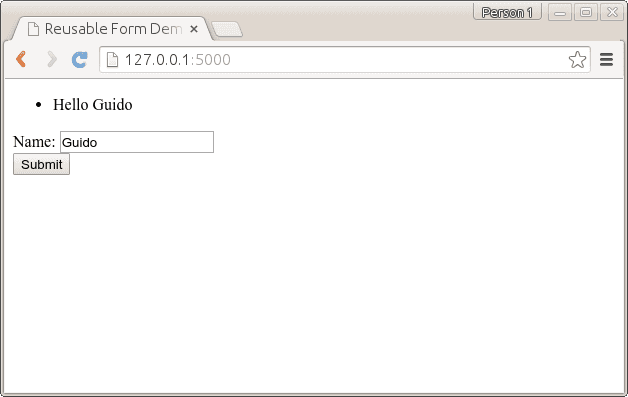 Python wtforms, text field validation. The app returns the name if entered
css with Flask
We use bootstrap to style the form.Bootstrap is a popular HTML, CSS, and JS framework for developing responsive, mobile first projects on the web. It makes front-end web development faster and easier. The output will be: Flask wtformsYou can get the bootstrap files from http://getbootstrap.com/getting-started/#download and extract them in a new directory /static/. The code remains almost the same, but the template is changed. Code:
from flask import Flask, render_template, flash, request
from wtforms import Form, TextField, TextAreaField, validators, StringField, SubmitField
# App config.
DEBUG = True
app = Flask(__name__)
app.config.from_object(__name__)
app.config['SECRET_KEY'] = '7d441f27d441f27567d441f2b6176a'
class ReusableForm(Form):
    name = TextField('Name:', validators=[validators.required()])

    @app.route("/", methods=['GET', 'POST'])
    def hello():
        form = ReusableForm(request.form)

        print form.errors
        if request.method == 'POST':
        name=request.form['name']
        print name

        if form.validate():
        # Save the comment here.
            flash('Hello ' + name)
        else:
            flash('Error: All the form fields are required. ')

        return render_template('hello.html', form=form)
if __name__ == "__main__":
    app.run()
We added bootstrap to the template hello.html:
<title>Reusable Form Demo</title>
        	 	<link rel="stylesheet" media="screen" href="static/bootstrap.min.css">
        	 	<link rel="stylesheet" href="static/bootstrap-theme.min.css">
       <meta name="viewport" content="width=device-width, initial-scale=1.0">
<div class="container">
<h2>Flask Web Form</h2>
<form action="" method="post" role="form">
    { { form.csrf }}
<div class="form-group">
      <label for="name">Name:</label>
<input type="text" class="form-control" id="name" name="name" placeholder="What's your name?"></div>
<button type="submit" class="btn btn-success">Submit</button>
</form>{% with messages = get_flashed_messages(with_categories=true) %}
{% if messages %}
{% for message in messages %}
{% if "Error" not in message[1]: %}
<div class="alert alert-info">
                <strong>Success! </strong> { { message[1] }}</div>
{% endif %}
{% if "Error" in message[1]: %}
<div class="alert alert-warning">
                { { message[1] }}</div>
{% endif %}
{% endfor %}
{% endif %}
{% endwith %}
</div>
Flask registration form
We use the same principle to create a registration form asking for name, email and password. We update the Form class:class ReusableForm(Form):
name = TextField('Name:', validators=[validators.required()])
email = TextField('Email:', validators=[validators.required(), validators.Length(min=6, max=35)])
password = TextField('Password:', validators=[validators.required(), validators.Length(min=3, max=35)])
def reset(self):
blankData = MultiDict([ ('csrf', self.reset_csrf() ) ])
self.process(blankData)And we can get the variables passed using:
name=request.form['name']
password=request.form['password']
email=request.form['email']
Full code:
from flask import Flask, render_template, flash, request
from wtforms import Form, TextField, TextAreaField, validators, StringField, SubmitField
# App config.
DEBUG = True
app = Flask(__name__)
app.config.from_object(__name__)
app.config['SECRET_KEY'] = '7d441f27d441f27567d441f2b6176a'
class ReusableForm(Form):
    name = TextField('Name:', validators=[validators.required()])
    email = TextField('Email:', validators=[validators.required(), validators.Length(min=6, max=35)])
    password = TextField('Password:', validators=[validators.required(), validators.Length(min=3, max=35)])

    @app.route("/", methods=['GET', 'POST'])
    def hello():
        form = ReusableForm(request.form)

        print form.errors
        if request.method == 'POST':
            name=request.form['name']
            password=request.form['password']
            email=request.form['email']
            print name, " ", email, " ", password

        if form.validate():
        # Save the comment here.
            flash('Thanks for registration ' + name)
        else:
            flash('Error: All the form fields are required. ')

        return render_template('hello.html', form=form)
if __name__ == "__main__":
    app.run()
Update the template hello.html with this code:
<title>Reusable Form Demo</title>
        	 	<link rel="stylesheet" media="screen" href="static/bootstrap.min.css">
        	 	<link rel="stylesheet" href="static/bootstrap-theme.min.css">
       <meta name="viewport" content="width=device-width, initial-scale=1.0">
<div class="container">
<h2>Flask Web Form</h2>
<form action="" method="post" role="form">
    { { form.csrf }}
<div class="form-group">
      <label for="name">Name:</label>
<input type="text" class="form-control" id="name" name="name" placeholder="What's your name?">
<label for="email">Email:</label>
<input type="text" class="form-control" id="email" name="email" placeholder="Your email will be used to contact you.">
<label for="password">Password:</label>
<input type="password" class="form-control" id="password" name="password" placeholder="Enter a password.">
</div>
<button type="submit" class="btn btn-success">Sign Up</button>
</form>{% with messages = get_flashed_messages(with_categories=true) %}
{% if messages %}
{% for message in messages %}
{% if "Error" not in message[1]: %}
<div class="alert alert-info">
                <strong>Success! </strong> { { message[1] }}</div>
{% endif %}
{% if "Error" in message[1]: %}
<div class="alert alert-warning">
                { { message[1] }}</div>
{% endif %}
{% endfor %}
{% endif %}
{% endwith %}
</div>
Output:
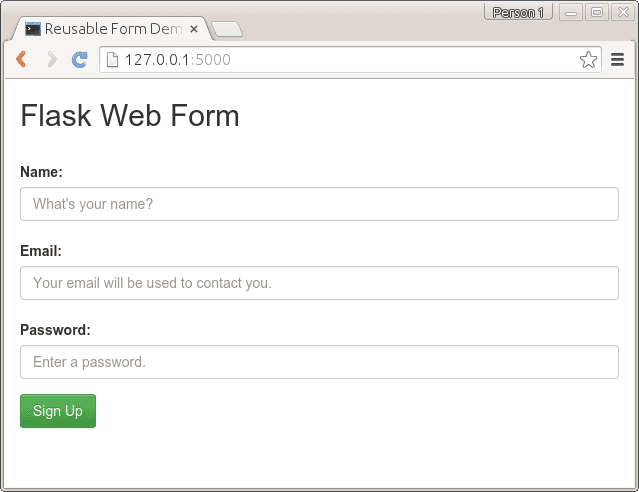 flask form bootstrap
WTForms can validate email, password, numbers and many more. For a list of validators see: http://wtforms.readthedocs.org/en/latest/validators.html