
QT4 Progressbar
In this article we will demonstrate how to use the progressbar widget. The progressbar is different from the other widgets in that it updates in time.
QT4 Progressbar Example Let's start with the code:
#! /usr/bin/env python
# -*- coding: utf-8 -*-
#
import sys
from PyQt4.QtGui import *
from PyQt4.QtCore import *
from PyQt4.QtCore import pyqtSlot,SIGNAL,SLOT
class QProgBar(QProgressBar):
value = 0
@pyqtSlot()
    def increaseValue(progressBar):
        progressBar.setValue(progressBar.value)
        progressBar.value = progressBar.value+1
# Create an PyQT4 application object.
a = QApplication(sys.argv)
# The QWidget widget is the base class of all user interface objects in PyQt4.
w = QWidget()
# Set window size.
w.resize(320, 240)
# Set window title
w.setWindowTitle("PyQT4 Progressbar @ pythonspot.com ")
# Create progressBar.
bar = QProgBar(w)
bar.resize(320,50)
bar.setValue(0)
bar.move(0,20)
# create timer for progressBar
timer = QTimer()
bar.connect(timer,SIGNAL("timeout()"),bar,SLOT("increaseValue()"))
timer.start(400)
# Show window
w.show()
sys.exit(a.exec_())
The instance bar (of class QProgBar) is used to hold the value of the progressbar. We call the function setValue() to update its value. The parameter w is given to attach it to the main window. We then move it to position (0,20) on the screen and give it a width and height.
To update the progressbar in time we need a QTimer(). We connect the widget with the timer, which calls the function increaseValue(). We set the timer to repeat the function call every 400 milliseconds. You also see the words SLOT and SIGNAL. If a user does an action such as clicking on a button, typing text in a box - the widget sends out a signal. This signal does nothing, but it can be used to connect with a slot, that acts as a receiver and acts on it.
Result:
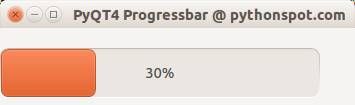 PyQT Progressbar
Download PyQT Code (Bulk Collection)