
Tk dropdown example
Tkinter supports dropdown menus. This is similar to your standard combobox on your operating system.
The widget is called OptionMenu and the parameters you need are: frame, tk variable and a dictionary with choices.
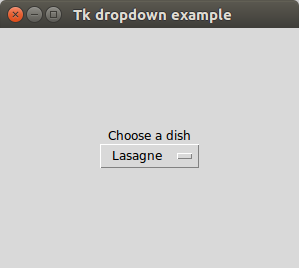
Tkinter dropdown example
The example below creates a Tkinter window with a combobox.from Tkinter import *
import Tkinter as ttk
from ttk import *
root = Tk()
root.title("Tk dropdown example")
# Add a grid
mainframe = Frame(root)
mainframe.grid(column=0,row=0, sticky=(N,W,E,S) )
mainframe.columnconfigure(0, weight = 1)
mainframe.rowconfigure(0, weight = 1)
mainframe.pack(pady = 100, padx = 100)
# Create a Tkinter variable
tkvar = StringVar(root)
# Dictionary with options
choices = { 'Pizza','Lasagne','Fries','Fish','Potatoe'}
tkvar.set('Pizza') # set the default option
popupMenu = OptionMenu(mainframe, tkvar, *choices)
Label(mainframe, text="Choose a dish").grid(row = 1, column = 1)
popupMenu.grid(row = 2, column =1)
# on change dropdown value
def change_dropdown(*args):
print( tkvar.get() )
# link function to change dropdown
tkvar.trace('w', change_dropdown)
root.mainloop()
It starts by creating a Tk object and pass it to a tkinter frame created with Frame()
root = Tk()
root.title("Tk dropdown example")
mainframe = Frame(root)
A grid is added to the frame which will hold the combo-box.
mainframe.grid(column=0,row=0, sticky=(N,W,E,S) )
mainframe.columnconfigure(0, weight = 1)
mainframe.rowconfigure(0, weight = 1)
mainframe.pack(pady = 100, padx = 100)
The popup menu contains a list of options which is defined in the variable choices. A Tkinter variable is created with the line:
tkvar = StringVar(root)The default value of the variable is set with the .set() method. We create the Tkinter combobox with:
popupMenu = OptionMenu(mainframe, tkvar, *choices)And link the callback method change_dropdown to this combobox.