
Maze in Pygame
In this tutorial you will learn how to build a maze game. The idea is simply to move around the maze with the arrow keys.
Getting started: Basic structure and event handling. We define a class Player which holds the players position on the screen and the speed by which it moves. In addition we define the actions a Player instance can do (movements):
class Player:
    x = 10
    y = 10
    speed = 1

    def moveRight(self):
        self.x = self.x + self.speed

    def moveLeft(self):
        self.x = self.x - self.speed

    def moveUp(self):
        self.y = self.y - self.speed

    def moveDown(self):
self.y = self.y + self.speedpygame.event.pump()
keys = pygame.key.get_pressed()
if (keys[K_RIGHT]):
print "Right arrow pressed."from pygame.locals import *
import pygame
class Player:
x = 10
y = 10
speed = 1
def moveRight(self):
self.x = self.x + self.speed
def moveLeft(self):
self.x = self.x - self.speed
def moveUp(self):
self.y = self.y - self.speed
def moveDown(self):
self.y = self.y + self.speed
class App:
windowWidth = 800
windowHeight = 600
player = 0
def __init__(self):
self._running = True
self._display_surf = None
self._image_surf = None
self.player = Player()
def on_init(self):
pygame.init()
self._display_surf = pygame.display.set_mode((self.windowWidth,self.windowHeight), pygame.HWSURFACE)
pygame.display.set_caption('Pygame pythonspot.com example')
self._running = True
self._image_surf = pygame.image.load("pygame.png").convert()
def on_event(self, event):
if event.type == QUIT:
self._running = False
def on_loop(self):
pass
def on_render(self):
self._display_surf.fill((0,0,0))
self._display_surf.blit(self._image_surf,(self.player.x,self.player.y))
pygame.display.flip()
def on_cleanup(self):
pygame.quit()
def on_execute(self):
if self.on_init() == False:
self._running = False
while( self._running ):
pygame.event.pump()
keys = pygame.key.get_pressed()
if (keys[K_RIGHT]):
self.player.moveRight()
if (keys[K_LEFT]):
self.player.moveLeft()
if (keys[K_UP]):
self.player.moveUp()
if (keys[K_DOWN]):
self.player.moveDown()
if (keys[K_ESCAPE]):
self._running = False
self.on_loop()
self.on_render()
self.on_cleanup()
if __name__ == "__main__" :
theApp = App()
theApp.on_execute()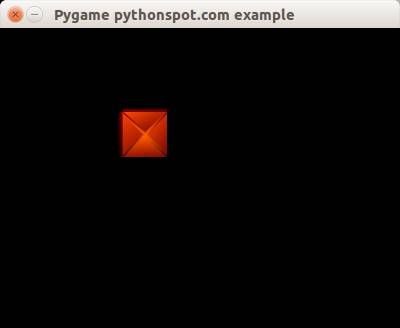 pygame
Creating the maze
We define a matrix of NxM to represent the positions of the maze blocks. In this matrix the element 1 represents the presence of a block and element 0 represents the absence.
class Maze:
    def __init__(self):
       self.M = 10
       self.N = 8
       self.maze = [ 1,1,1,1,1,1,1,1,1,1,
                     1,0,0,0,0,0,0,0,0,1,
                     1,0,0,0,0,0,0,0,0,1,
                     1,0,1,1,1,1,1,1,0,1,
                     1,0,1,0,0,0,0,0,0,1,
                     1,0,1,0,1,1,1,1,0,1,
                     1,0,0,0,0,0,0,0,0,1,
                     1,1,1,1,1,1,1,1,1,1,]
We have this complete code to draw the maze:
from pygame.locals import *
import pygame

class Player:
    x = 44
    y = 44
    speed = 1

    def moveRight(self):
        self.x = self.x + self.speed

    def moveLeft(self):
        self.x = self.x - self.speed

    def moveUp(self):
        self.y = self.y - self.speed

    def moveDown(self):
        self.y = self.y + self.speed

class Maze:
    def __init__(self):
       self.M = 10
       self.N = 8
       self.maze = [ 1,1,1,1,1,1,1,1,1,1,
                     1,0,0,0,0,0,0,0,0,1,
                     1,0,0,0,0,0,0,0,0,1,
                     1,0,1,1,1,1,1,1,0,1,
                     1,0,1,0,0,0,0,0,0,1,
                     1,0,1,0,1,1,1,1,0,1,
                     1,0,0,0,0,0,0,0,0,1,
                     1,1,1,1,1,1,1,1,1,1,]
def draw(self,display_surf,image_surf):
       bx = 0
       by = 0
       for i in range(0,self.M*self.N):
           if self.maze[ bx + (by*self.M) ] == 1:
               display_surf.blit(image_surf,( bx * 44 , by * 44))

           bx = bx + 1
           if bx > self.M-1:
               bx = 0
               by = by + 1
class App:

    windowWidth = 800
    windowHeight = 600
    player = 0

    def __init__(self):
        self._running = True
        self._display_surf = None
        self._image_surf = None
        self._block_surf = None
        self.player = Player()
        self.maze = Maze()

    def on_init(self):
        pygame.init()
        self._display_surf = pygame.display.set_mode((self.windowWidth,self.windowHeight), pygame.HWSURFACE)

        pygame.display.set_caption('Pygame pythonspot.com example')
        self._running = True
        self._image_surf = pygame.image.load("player.png").convert()
        self._block_surf = pygame.image.load("block.png").convert()

    def on_event(self, event):
        if event.type == QUIT:
            self._running = False

    def on_loop(self):
        pass

    def on_render(self):
        self._display_surf.fill((0,0,0))
        self._display_surf.blit(self._image_surf,(self.player.x,self.player.y))
        self.maze.draw(self._display_surf, self._block_surf)
        pygame.display.flip()

    def on_cleanup(self):
        pygame.quit()

    def on_execute(self):
        if self.on_init() == False:
            self._running = False

        while( self._running ):
            pygame.event.pump()
            keys = pygame.key.get_pressed()

            if (keys[K_RIGHT]):
                self.player.moveRight()

            if (keys[K_LEFT]):
                self.player.moveLeft()

            if (keys[K_UP]):
                self.player.moveUp()

            if (keys[K_DOWN]):
                self.player.moveDown()

            if (keys[K_ESCAPE]):
                self._running = False

            self.on_loop()
            self.on_render()
        self.on_cleanup()

if __name__ == "__main__" :
    theApp = App()
    theApp.on_execute()
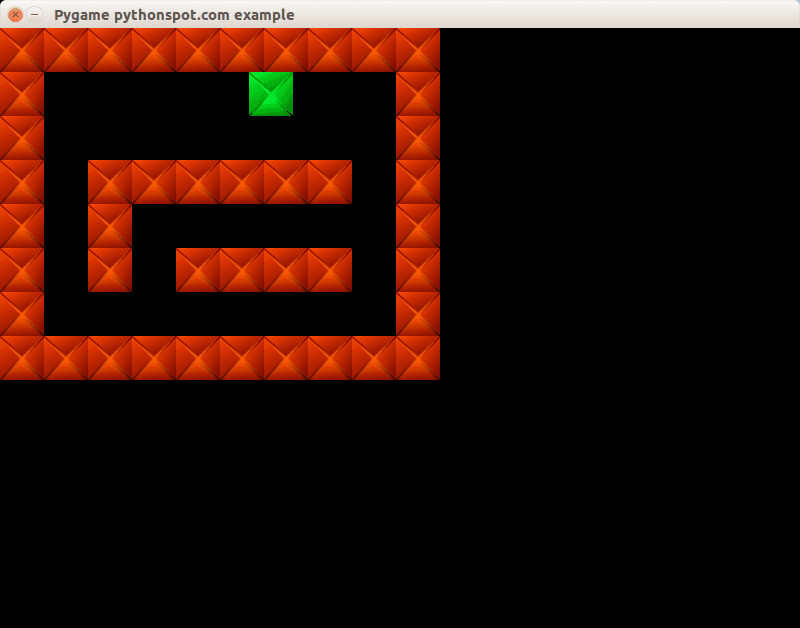 maze
mazeConcluding You learned how to create a 2d maze in Python. Now you may want to add collision detection which we showed in our previous tutorial. Because we already explained that concept we will not go over it again :-)