
Pandas groupby
DataFrames can be summarized using the groupby method. In this article we'll give you an example of how to use the groupby method.
Pandas groupby
Start by importing pandas, numpy and creating a data frame. Our data frame contains simple tabular data:
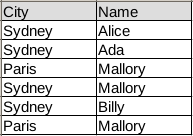
In code the same table is:
import pandas as pd
import numpy as np
df1 = pd.DataFrame( {
    "Name" : ["Alice", "Ada", "Mallory", "Mallory", "Billy" , "Mallory"] ,
    "City" : ["Sydney", "Sydney", "Paris", "Sydney", "Sydney", "Paris"]} )
We can then summarize the data using the groupby method:
print df1.groupby(["City"])[['Name']].count()This will count the frequency of each city and return a new data frame:
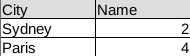
The total code being:
import pandas as pd
import numpy as np
df1 = pd.DataFrame( {
    "Name" : ["Alice", "Ada", "Mallory", "Mallory", "Billy" , "Mallory"] ,
    "City" : ["Sydney", "Sydney", "Paris", "Sydney", "Sydney", "Paris"]} )
df2 = df1.groupby(["City"])[['Name']].count()
print(df2)