
Pandas read CSV
Pandas is a data analaysis module. It provides you with high-performance, easy-to-use data structures and data analysis tools.
In this article you will learn how to read a csv file with Pandas.
Read CSV with Python Pandas We create a comma seperated value (csv) file:
Names,Highscore,
Mel,8,
Jack,5,
David,3,
Peter,6,
Maria,5,
Ryan,9,Imported in excel that will look like this:
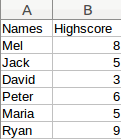 Python Pandas example dataset
The data can be read using:
from pandas import DataFrame, read_csv
import matplotlib.pyplot as plt
import pandas as pd
file = r'highscore.csv'
df = pd.read_csv(file)
print(df)
The first lines import the Pandas module. The read_csv method loads the data in a a Pandas dataframe that we named df.
Dataframes A dataframe can be manipulated using methods, the minimum and maximum can easily be extracted:
from pandas import DataFrame, read_csv
import matplotlib.pyplot as plt
import pandas as pd
file = r'highscore.csv'
df = pd.read_csv(file)
print('Max', df['Highscore'].max())
print('Min', df['Highscore'].min())
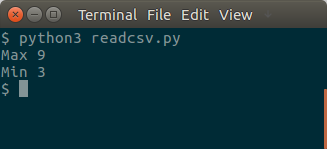 Pandas on a dataset
The dataset in this example is very small, but a dataset can easily contain thousands or millions of records.