
Save a dictionary to a file
Given a dictionary such as:
dict = {'Python' : '.py', 'C++' : '.cpp', 'Java' : '.java'}We can save it to one of these formats:
- Comma seperated value file (.csv)
- Json file (.json)
- Text file (.txt)
- Pickle file (.pkl)
Related Course:
save dictionary as csv file
we can write it to a file with the csv module.
import csv
dict = {'Python' : '.py', 'C++' : '.cpp', 'Java' : '.java'}
w = csv.writer(open("output.csv", "w"))
for key, val in dict.items():
    w.writerow([key, val])
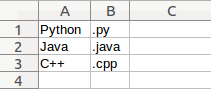 The dictionary file (csv) can be opened in Google Docs or Excel
save dictionary to json file
If you want to save a dictionary to a json file
import json
dict = {'Python' : '.py', 'C++' : '.cpp', 'Java' : '.java'}
json = json.dumps(dict)
f = open("dict.json","w")
f.write(json)
f.close()
save dictionary to text file (raw, .txt)
You can save your dictionary to a text file using the code below:
dict = {'Python' : '.py', 'C++' : '.cpp', 'Java' : '.java'}
f = open("dict.txt","w")
f.write( str(dict) )
f.close()
save dictionary to a pickle file (.pkl)
The pickle module may be used to save dictionaries (or other objects) to a file. The module can serialize and deserialize Python objects.
import pickle
dict = {'Python' : '.py', 'C++' : '.cpp', 'Java' : '.java'}
f = open("file.pkl","wb")
pickle.dump(dict,f)
f.close()