
Tk menubar
The Tkinter toolkit comes with all the basic widgets to create graphical applications. Almost every app has a main menu. As expected, Tkinter supports adding a main menu to your application window.
The screenshot below demonstrates a Tkinter based menu:
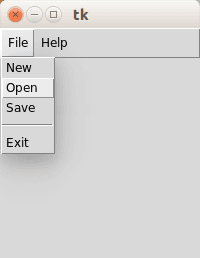 Tkinter menu
Tkinter menubar
You can create a simle menu with Tkinter using the code below. Every option (new, open, save.. ) should have its own callback.from Tkinter import *
def donothing():
x = 0
root = Tk()
menubar = Menu(root)
filemenu = Menu(menubar, tearoff=0)
filemenu.add_command(label="New", command=donothing)
filemenu.add_command(label="Open", command=donothing)
filemenu.add_command(label="Save", command=donothing)
filemenu.add_separator()
filemenu.add_command(label="Exit", command=root.quit)
menubar.add_cascade(label="File", menu=filemenu)
helpmenu = Menu(menubar, tearoff=0)
helpmenu.add_command(label="Help Index", command=donothing)
helpmenu.add_command(label="About...", command=donothing)
menubar.add_cascade(label="Help", menu=helpmenu)
root.config(menu=menubar)
root.mainloop()
We create the menubar with the call:
menubar = Menu(root)where root is a Tk() object.
A menubar may contain zero or more submenus such as the file menu, edit menu, view menu, tools menu etcetera.
A submenu can be created using the same Menu() call, where the first argument is the menubar to attach to.
filemenu = Menu(menubar, tearoff=0)
menu = Menu(menubar, tearoff=0)
Individual options can be added to these submenus using the add_command() method:
filemenu.add_command(label="New", command=donothing)
filemenu.add_command(label="Open", command=donothing)
filemenu.add_command(label="Save", command=donothing)
In the example we created the callback function donothing() and linked every command to it for simplicity. An option is added using the add_comment() function. We call add_cascade() to add this menu list to the specific list.