
Menu with PyQt4
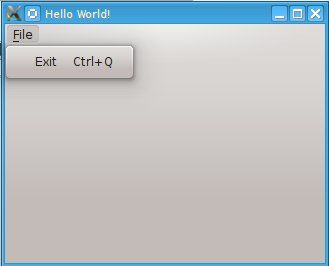 PyQT Menu
PyQt4 menus appear in the top of the window bar. A menu gives the user control over the application and is often location in the top of the window.
The QMainWindow class creates the main application window. This class has a method named menuBar() which adds the title bar.
Menus can be added to the title bar using addMenu(). Inside each menu you can add a command using the addAction method.
PyQt4 menubar
This code will add a menu to your qt4 app:#! /usr/bin/env python
# -*- coding: utf-8 -*-
#
import sys
from PyQt4.QtGui import *
# Create an PyQT4 application object.
a = QApplication(sys.argv)
# The QWidget widget is the base class of all user interface objects in PyQt4.
w = QMainWindow()
# Set window size.
w.resize(320, 240)
# Set window title
w.setWindowTitle("Hello World!")
# Create main menu
mainMenu = w.menuBar()
mainMenu.setNativeMenuBar(False)
fileMenu = mainMenu.addMenu('&File')
# Add exit button
exitButton = QAction(QIcon('exit24.png'), 'Exit', w)
exitButton.setShortcut('Ctrl+Q')
exitButton.setStatusTip('Exit application')
exitButton.triggered.connect(w.close)
fileMenu.addAction(exitButton)
# Show window
w.show()
sys.exit(a.exec_())
Download PyQT Code (Bulk Collection)