
tkinter askquestion dialog
Tkinter supports showing a message box. The implementation you need depends on your Python version. To test your version:
python -- version
Tkinter question dialog
Tkinter can be used to ask the users questions.Python 2.x The Python 2.x version:
import Tkinter
import tkMessageBox
result = tkMessageBox.askyesno("Python","Would you like to save the data?")
print result
Python 3 The Python 3.x version:
import tkinter
from tkinter import messagebox

messagebox.askokcancel("Python","Would you like to save the data?")
Result:
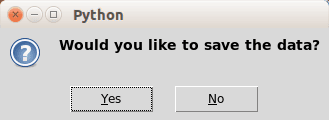 tk question
Tkinter message boxes
This code will open some Tkinter question boxes:Python 2.7 The Python 2.x version:
import Tkinter
import tkMessageBox
# Confirmation messagebox
tkMessageBox.askokcancel("Title","The application will be closed")
# Option messagebox
tkMessageBox.askyesno("Title","Do you want to save?")
# Try again messagebox
tkMessageBox.askretrycancel("Title","Installation failed, try again?")
Python 3 The Python 3.x version:
import tkinter
from tkinter import messagebox

messagebox.askokcancel("Title","The application will be closed")
messagebox.askyesno("Title","Do you want to save?")
messagebox.askretrycancel("Title","Installation failed, try again?")
Result:
 Tk question box