Tokenizing Words and Sentences with NLTK
 Natural Language Processing with Python
In this article you will learn how to tokenize data (by words and sentences).
Install NLTK
Install NLTK with Python 2.x using:sudo pip install nltkInstall NLTK with Python 3.x using:
sudo pip3 install nltkInstallation is not complete after these commands. Open python and type:
import nltk
nltk.download()
A graphical interface will be presented:
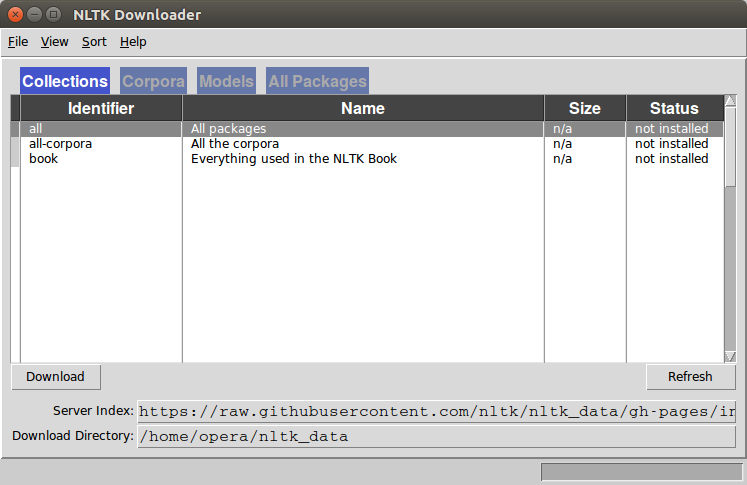
Click all and then click download. It will download all the required packages which may take a while, the bar on the bottom shows the progress.
Tokenize words
A sentence or data can be split into words using the method word_tokenize():from nltk.tokenize import sent_tokenize, word_tokenize
data = "All work and no play makes jack a dull boy, all work and no play"
print(word_tokenize(data))
This will output:
['All', 'work', 'and', 'no', 'play', 'makes', 'jack', 'dull', 'boy', ',', 'all', 'work', 'and', 'no', 'play']All of them are words except the comma. Special characters are treated as separate tokens.
Tokenizing sentences
The same principle can be applied to sentences. Simply change the to sent_tokenize() We have added two sentences to the variable data:from nltk.tokenize import sent_tokenize, word_tokenize
data = "All work and no play makes jack dull boy. All work and no play makes jack a dull boy."
print(sent_tokenize(data))
Outputs:
['All work and no play makes jack dull boy.', 'All work and no play makes jack a dull boy.']NLTK and arrays
If you wish to you can store the words and sentences in arrays:from nltk.tokenize import sent_tokenize, word_tokenize
data = "All work and no play makes jack dull boy. All work and no play makes jack a dull boy."
phrases = sent_tokenize(data)
words = word_tokenize(data)
print(phrases)
print(words)