
Car tracking with cascades
 Car Tracking with OpenCV
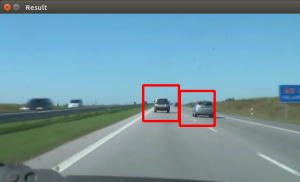
In this tutorial we will look at vehicle tracking using haar features. We have a haar cascade file trained on cars.
The program will detect regions of interest, classify them as cars and show rectangles around them.
Detecting with cascades
Lets start with the basic cascade detection program:#! /usr/bin/python
import cv2
face_cascade = cv2.CascadeClassifier('cars.xml')
vc = cv2.VideoCapture('road.avi')
if vc.isOpened():
rval , frame = vc.read()
else:
rval = False
while rval:
rval, frame = vc.read()
# car detection.
cars = face_cascade.detectMultiScale(frame, 1.1, 2)
ncars = 0
for (x,y,w,h) in cars:
cv2.rectangle(frame,(x,y),(x+w,y+h),(0,0,255),2)
ncars = ncars + 1
# show result
cv2.imshow("Result",frame)
cv2.waitKey(1);
vc.release()
This will detect cars in the screen but also noise and the screen will be jittering sometimes. To avoid all of these, we have to improve our car tracking algorithm. We decided to come up with a simple solution.
Car tracking algorithm
For every frame:- Detect potential regions of interest
- Filter detected regions based on vertical,horizontal similarity
- If its a new region, add to the collection
- Clear collection every 30 frames
ROI detection A car may not be detected in every frame. If a new car is detected, its added to the collection. We keep this collection for 30 frames, then clear it.
#! /usr/bin/python
import cv2
import numpy as np
def diffUpDown(img):
    # compare top and bottom size of the image
    # 1. cut image in two
    # 2. flip the top side
    # 3. resize to same size
    # 4. compare difference
    height, width, depth = img.shape
    half = height/2
    top = img[0:half, 0:width]
    bottom = img[half:half+half, 0:width]
    top = cv2.flip(top,1)
    bottom = cv2.resize(bottom, (32, 64))
    top = cv2.resize(top, (32, 64))
    return ( mse(top,bottom) )
def diffLeftRight(img):
    # compare left and right size of the image
    # 1. cut image in two
    # 2. flip the right side
    # 3. resize to same size
    # 4. compare difference
    height, width, depth = img.shape
    half = width/2
    left = img[0:height, 0:half]
    right = img[0:height, half:half + half-1]
    right = cv2.flip(right,1)
    left = cv2.resize(left, (32, 64))
    right = cv2.resize(right, (32, 64))
    return ( mse(left,right) )
def mse(imageA, imageB):
    err = np.sum((imageA.astype("float") - imageB.astype("float")) ** 2)
    err /= float(imageA.shape[0] * imageA.shape[1])
    return err
def isNewRoi(rx,ry,rw,rh,rectangles):
    for r in rectangles:
        if abs(r[0] - rx) < 40 and abs(r[1] - ry) < 40:
            return False
        return True
def detectRegionsOfInterest(frame, cascade):
    scaleDown = 2
    frameHeight, frameWidth, fdepth = frame.shape
    # Resize
    frame = cv2.resize(frame, (frameWidth/scaleDown, frameHeight/scaleDown))
    frameHeight, frameWidth, fdepth = frame.shape
# haar detection.
    cars = cascade.detectMultiScale(frame, 1.2, 1)
newRegions = []
    minY = int(frameHeight*0.3)

    # iterate regions of interest
    for (x,y,w,h) in cars:
        roi = [x,y,w,h]
        roiImage = frame[y:y+h, x:x+w]

        carWidth = roiImage.shape[0]
        if y > minY:
            diffX = diffLeftRight(roiImage)
            diffY = round(diffUpDown(roiImage))
        if diffX > 1600 and diffX < 3000 and diffY > 12000:
            rx,ry,rw,rh = roi
            newRegions.append( [rx*scaleDown,ry*scaleDown,rw*scaleDown,rh*scaleDown] )
return newRegions

def detectCars(filename):
    rectangles = []
    cascade = cv2.CascadeClassifier('cars.xml')
    vc = cv2.VideoCapture(filename)

    if vc.isOpened():
        rval , frame = vc.read()
    else:
        rval = False
roi = [0,0,0,0]
    frameCount = 0
while rval:
    rval, frame = vc.read()
    frameHeight, frameWidth, fdepth = frame.shape

    newRegions = detectRegionsOfInterest(frame, cascade)
    for region in newRegions:
    if isNewRoi(region[0],region[1],region[2],region[3],rectangles):
        rectangles.append(region)

    for r in rectangles:
        cv2.rectangle(frame,(r[0],r[1]),(r[0]+r[2],r[1]+r[3]),(0,0,255),3)

    frameCount = frameCount + 1
    if frameCount > 30:
        frameCount = 0
        rectangles = []

    # show result
    cv2.imshow("Result",frame)
    cv2.waitKey(1);
    vc.release()
detectCars('road.avi')
Final notes The cascades are not rotation invariant, scale and translation invariant. In addition, Detecting vehicles with haar cascades may work reasonably well, but there is gain with other algorithms (salient points).
Download Code + Video + Cascade file