
PyQT5 input dialog
PyQt5 supports several input dialogs, to use them import QInputDialog.
from PyQt5.QtWidgets import QApplication, QWidget, QInputDialog, QLineEditAn overview of PyQt5 input dialogs:
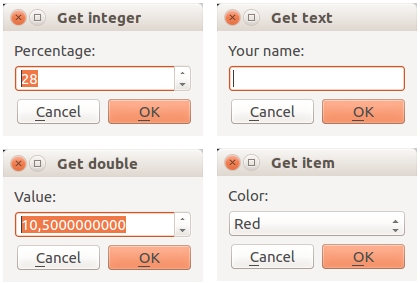
Get integer Get an integer with QInputDialog.getInt():
def getInteger(self):
    i, okPressed = QInputDialog.getInt(self, "Get integer","Percentage:", 28, 0, 100, 1)
    if okPressed:
        print(i)
Parameters in order: self, window title, label (before input box), default value, minimum, maximum and step size.
Get double Get a double with QInputDialog.getDouble():
def getDouble(self):
    d, okPressed = QInputDialog.getDouble(self, "Get double","Value:", 10.05, 0, 100, 10)
    if okPressed:
        print(d)
The last parameter (10) is the number of decimals behind the comma.
Get item/choice Get an item from a dropdown box:
def getChoice(self):
    items = ("Red","Blue","Green")
    item, okPressed = QInputDialog.getItem(self, "Get item","Color:", items, 0, False)
    if okPressed and item:
        print(item)
Get a string Get a string using QInputDialog.getText()
def getText(self):
    text, okPressed = QInputDialog.getText(self, "Get text","Your name:", QLineEdit.Normal, "")
    if okPressed and text != '':
        print(text)
Example all PyQt5 input dialogs Complete example below:
import sys
from PyQt5.QtWidgets import QApplication, QWidget, QInputDialog, QLineEdit
from PyQt5.QtGui import QIcon
class App(QWidget):
def __init__(self):
        super().__init__()
        self.title = 'PyQt5 input dialogs - pythonspot.com'
        self.left = 10
        self.top = 10
        self.width = 640
        self.height = 480
        self.initUI()

    def initUI(self):
        self.setWindowTitle(self.title)
        self.setGeometry(self.left, self.top, self.width, self.height)

        self.getInteger()
        self.getText()
        self.getDouble()
        self.getChoice()

        self.show()

    def getInteger(self):
        i, okPressed = QInputDialog.getInt(self, "Get integer","Percentage:", 28, 0, 100, 1)
        if okPressed:
            print(i)
def getDouble(self):
        d, okPressed = QInputDialog.getDouble(self, "Get double","Value:", 10.50, 0, 100, 10)
        if okPressed:
            print( d)

    def getChoice(self):
        items = ("Red","Blue","Green")
        item, okPressed = QInputDialog.getItem(self, "Get item","Color:", items, 0, False)
        if ok and item:
            print(item)
def getText(self):
        text, okPressed = QInputDialog.getText(self, "Get text","Your name:", QLineEdit.Normal, "")
        if okPressed and text != '':
            print(text)
if __name__ == '__main__':
    app = QApplication(sys.argv)
    ex = App()
    sys.exit(app.exec_())